

CCTV Camera Installation Guide for Better Property Security
Learn about CCTV installation, DVR and NVR setup, wireless CCTV, remote monitoring, maintenance, and security support for safer properties.
Security problems usually become clear only when someone asks, “Can we check the camera?”
A missing parcel, a parking scratch, a shop dispute, or after-hours movement can all depend on one thing: clear CCTV footage.
That is why CCTV installation needs proper planning. The right setup helps capture important activity clearly, store footage safely, and make it easy to check when needed.
Why CCTV Has Become a Basic Security Need
Property movement has increased across India.
Homes receive more deliveries. Apartments have regular visitor movement. Shops manage customers, staff, stock, and billing. Offices need better access and visibility. Warehouses handle goods, vehicles, and dispatch activity throughout the day.
With so much movement, it becomes difficult to know what happened without a proper monitoring system.
CCTV helps users:
- Watch entry and exit points
- Record important incidents
- Track visitor and vehicle movement
- Improve staff and asset safety
- Reduce blind spots
- Check footage when there is confusion
A good CCTV system gives visual proof when people need clarity.
Good CCTV Installation Starts with Planning
Many CCTV problems begin before the camera is even switched on.
The installation is rushed. Cameras are placed wherever wiring is easy. Storage settings are not discussed. Mobile viewing is skipped. Night visibility is not tested.
A technician should first understand the property and the user’s actual security needs.
Before installation, check:
- Which areas need monitoring
- Where blind spots exist
- How much lighting is available
- Where wiring can be routed safely
- Whether internet access is stable
- How many days of footage should be stored
- Whether mobile viewing is required
- Whether backup power is needed
This planning helps decide the right number of cameras, camera type, storage system, and installation method.
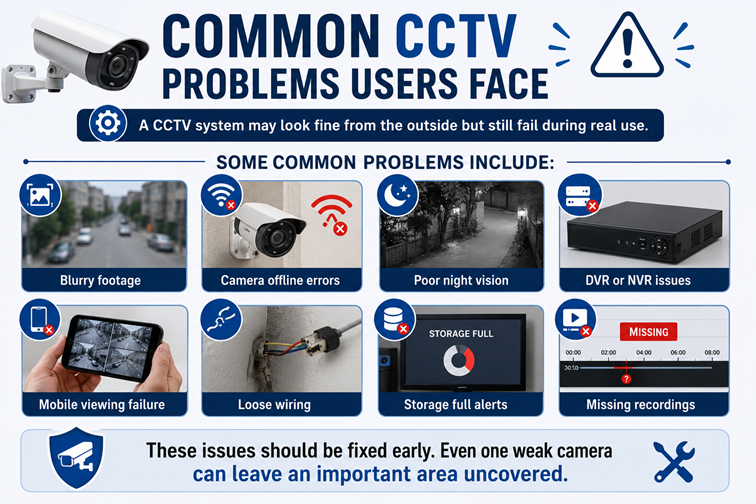
Why CCTV Footage Becomes Blurry
Blurry footage is one of the most common CCTV complaints.
It can happen because of dust on the lens, weak lighting, low camera quality, improper focus, wrong camera placement, or damaged cables.
Outdoor cameras need extra care. Dust, rain, heat, pollution, and insects can affect the lens over time. If the camera is placed too high or too far from the target area, it may capture movement but miss important details such as faces or vehicle numbers.
A technician should check the view after installation and adjust the angle properly.
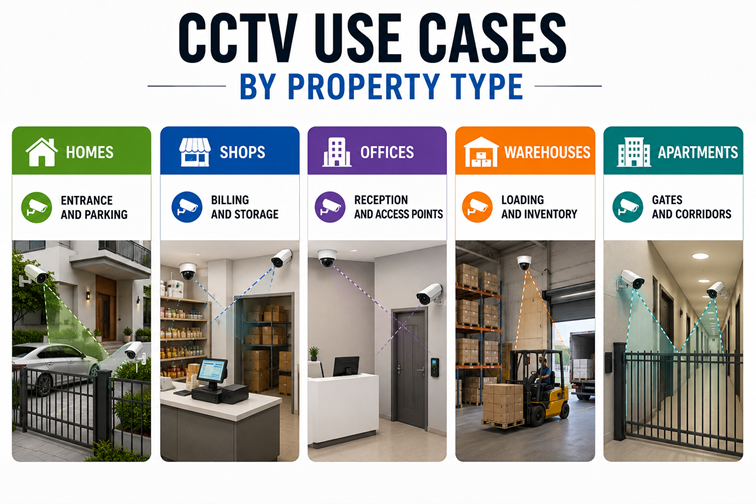
CCTV Use Cases by Property Type
| Property Type | Key Areas to Monitor | Main Benefit |
|---|---|---|
| Homes | Entrance, parking, staircase, and balcony access | Family and visitor safety |
| Shops | Billing counter, shelves, storage, entry points | Theft prevention and dispute clarity |
| Offices | Reception, access points, corridors, equipment rooms | Visitor and asset monitoring |
| Warehouses | Loading area, inventory zones, dispatch points | Stock and movement visibility |
| Apartments | Gates, lifts, parking, corridors | Common area monitoring |
This table helps users think practically before installation. The goal is to cover important areas clearly, not to add cameras without purpose.
Wired vs Wireless CCTV
| Feature | Wired CCTV | Wireless CCTV |
|---|---|---|
| Best For | Larger properties and continuous recording | Small homes and indoor spaces |
| Stability | More stable | Depends on the internet strength |
| Installation | Needs wiring | Easier to install |
| Signal Reliability | Fewer interruptions | May face network issues |
| Recording Use | Better for long-term monitoring | Suitable for basic monitoring |
| Scalability | Better for multiple cameras | Better for smaller setups |
Wired CCTV is usually preferred when reliability and continuous recording are important. Wireless CCTV works well for smaller spaces where installation flexibility matters and internet connectivity is strong.
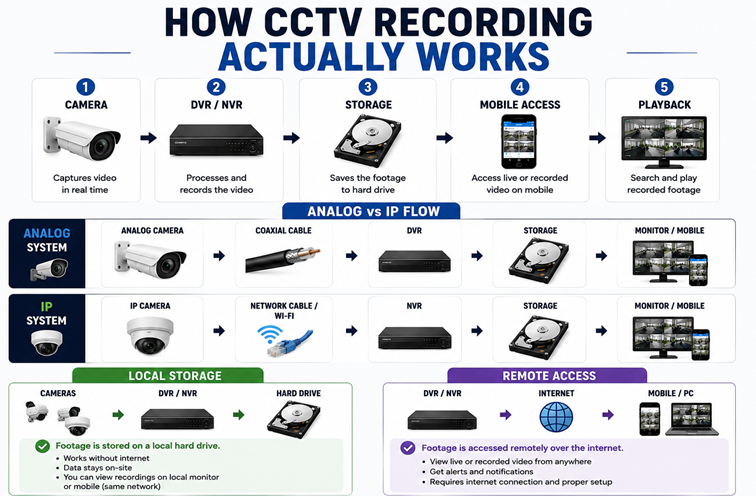
DVR and NVR Basics
DVR and NVR are recording systems used in CCTV setups.
DVR is commonly used with analog cameras. It is often chosen for basic, budget-friendly installations.
NVR works with IP cameras. It usually supports better video quality, network-based monitoring, and advanced features.
Before choosing a recording system, ask:
- How many days will the footage be stored?
- Can footage be viewed on mobile?
- Is the night recording clear?
- Can more cameras be added later?
- What happens during power cuts?
Storage planning is important. If storage is low, old footage may get deleted too soon. If recording quality is poor, saved footage may not help during an incident.
Night Vision and Low-Light Recording
Many cameras look clear during the day and perform poorly at night.
This becomes a serious problem in parking areas, outdoor gates, corridors, shops, and storage spaces. These are also the places where clear footage is often needed most.
Good night visibility depends on:
- Camera quality
- Lighting conditions
- Infrared support
- Camera angle
- Distance from the monitoring area
Before installation is closed, low-light footage should be checked. If the area is too dark, additional lighting may be needed.
Mobile Viewing and Remote Access
Mobile viewing is one of the most useful CCTV features.
It helps users check live footage while travelling, working, managing a shop, or monitoring another property. But remote access must be configured properly.
Common mobile viewing issues include app login errors, weak internet, DVR or NVR setting problems, router changes, or camera offline status.
Before the technician leaves, test live view and playback on the user’s phone. This avoids confusion later.
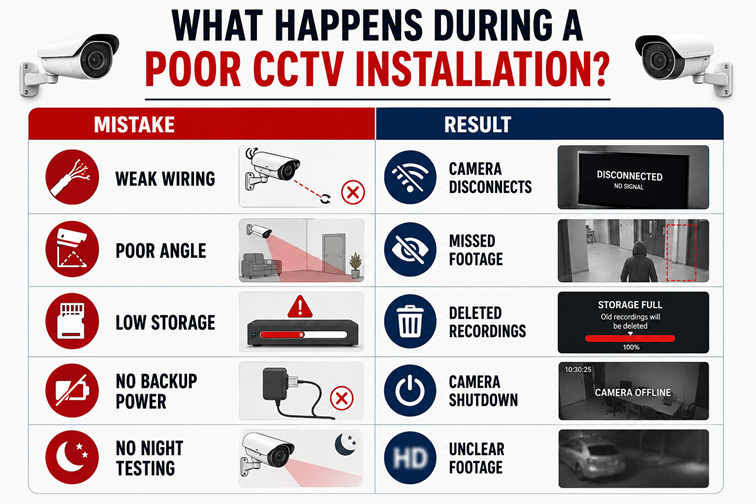
Common CCTV Installation Mistakes
Small installation mistakes can reduce the value of the full system.
Common mistakes include:
- Placing cameras too high
- Ignoring blind spots
- Using poor-quality wiring
- Skipping night vision checks
- Choosing low storage capacity
- Missing mobile access setup
- Forgetting playback testing
A proper installation should end with full testing. Camera fitting alone is not enough.
What to Check After Installation
Before closing the work, check:
- Live camera view
- Recording playback
- Camera angles
- Night vision quality
- Mobile access
- Storage settings
- Internet connection
- DVR or NVR status
Also ask the technician how to view old footage, how long recordings will remain, and what to do if a camera goes offline.
When CCTV Needs Service
CCTV systems need periodic inspection, especially outdoor cameras.
Call a technician if:
- Cameras disconnect often
- Video quality drops
- Recording stops
- Night vision weakens
- Mobile viewing fails
- Wiring looks loose
- DVR or NVR shows errors
Regular service may include lens cleaning, wiring checks, storage review, camera angle correction, recording tests, and mobile app troubleshooting.
A quick service check every few months can prevent last-minute panic when footage is needed.
How Fatafat Service Helps
Fatafat Service helps users find relevant CCTV service support without depending on random contacts or last-minute searches.
Users can get help with:
- CCTV installation
- DVR and NVR setup
- Wireless CCTV systems
- Remote monitoring
- Motion detection setup
- Camera troubleshooting
- Wiring support
- Security upgrades
- Maintenance checks
This makes it easier to handle new installations, repairs, mobile viewing issues, storage problems, and regular CCTV maintenance
The Bottom Line
CCTV improves property security when the system is planned, installed, tested, and maintained properly.
Clear footage, correct camera placement, reliable recording, night visibility, mobile access, and timely service all matter.
Fatafat Service helps users find professional CCTV installation and maintenance support, making security setup easier and more dependable.
| Need CCTV Support? Book CCTV installation, setup, repair, and maintenance with Fatafat Service. |
|---|
FAQs
1. Why is CCTV installation important?
CCTV installation helps monitor property activity, record incidents, improve safety, and reduce blind spots.
2. Where should CCTV cameras be installed?
Cameras should cover high-movement and high-risk areas such as entrances, parking spaces, corridors, staircases, billing counters, reception areas, and storage zones.
3. Which is better, wired or wireless CCTV?
Wired CCTV is more stable for larger spaces and continuous recording. Wireless CCTV works well for smaller spaces with strong internet connectivity.
4. How does Fatafat Service help with CCTV installation?
Fatafat Service helps users connect with professional support for CCTV installation, DVR and NVR setup, wireless CCTV systems, remote monitoring, troubleshooting, and maintenance.
5. What CCTV issues can Fatafat Service help with?
Fatafat Service can help users find support for offline cameras, unclear footage, recording failures, weak night vision, wiring faults, DVR or NVR issues, and regular maintenance.
6. Can Fatafat Service help with both new CCTV setup and existing system issues?
Yes. Fatafat Service helps users connect with relevant professionals for new CCTV installation, setup configuration, troubleshooting, repairs, upgrades, and maintenance support.